
Honda CR-V: Indicator, Coming On/Blinking / If the Low Oil Pressure Indicator Comes On
Honda CR-V 2017-2026 Owner's Manual / Handling the Unexpected / Indicator, Coming On/Blinking / If the Low Oil Pressure Indicator Comes On

Reasons for the indicator to come on
Comes on when the engine oil pressure is low.
What to do as soon as the indicator comes on
- Immediately park the vehicle on level ground in a safe place.
- If necessary, turn the hazard warning lights on.
What to do after parking the vehicle
- Stop the engine and let it sit for about three minutes.
- Open the hood and check the oil level.
- Start the engine and check the low oil pressure indicator.
- The indicator goes off: Start driving again.
- The indicator does not go off within 10 seconds: Stop the engine and contact a dealer for repairs immediately.
NOTICE
Running the engine with low oil pressure can cause serious mechanical damage almost immediately.

 If the Charging System Indicator Comes On
Reasons for the indicator to come on
Comes on when the battery is not being charged.
What to do when the indicator comes on
Turn off the climate control system, rear defogger, and other electrical
systems...
Other information:
Honda CR-V 2017-2026 Owner's Manual: Using the Sunshade Switch
Automatic operation To open: Pull the switch back firmly. To close: Push the switch forward firmly. The sunshade automatically opens or closes all the way. To stop the sunshade midway, touch the switch briefly. Manual operation To open: Pull the switch back lightly, and hold it until the desired position is reached...
Honda CR-V 2017-2026 Owner's Manual: Maintenance Items Under the Hood
Opening the Hood Park the vehicle on a level surface, and set the parking brake. Pull the hood release handle under the lower left corner of the dashboard. The hood will pop up slightly. Push the hood latch lever (located under the front edge of the hood to the center) to the side and raise the hood...
Categories
- Manuals Home
- Honda CR-V Owners Manual
- Honda CR-V Service Manual
- Interior Fuse Box
- Quick Reference Guide
- Rear Seats
- New on site
- Most important about car
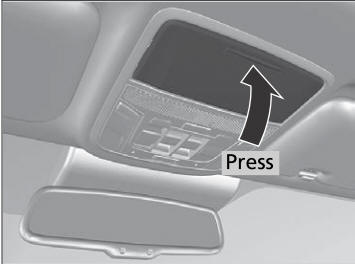
Sunglasses Holder
To open the sunglasses holder, press and release the indent. To close, press it again until it latches.
You can store eyeglasses and other small items in this holder.

Copyright © 2026 www.hocrv.com