
Honda CR-V: Off-Highway Driving Guidelines / Important Safety Precautions
Honda CR-V 2017-2026 Owner's Manual / Driving / Off-Highway Driving Guidelines / Important Safety Precautions
To avoid loss of control or rollover, be sure to follow all precautions and recommendations:
- Be sure to store cargo properly and do not exceed your cargo load limits.
- Whenever you drive, make sure you and your passengers always wear seat belts.
- Keep your speed low, and never go faster than the conditions allow.
- It’s up to you to continually assess the situation and drive within the limits.
 Off-Highway Driving Guidelines
Your vehicle has been designed primarily for use on pavement, however, its
higher
ground clearance allows you to occasionally travel on unpaved roads...
 Avoiding Trouble
Check Out Your Vehicle before you leave the pavement and make sure
that all
scheduled maintenance has been completed. Pay special attention to the
condition of the tires, and check the tire pressures...
Other information:
Honda CR-V 2017-2026 Owner's Manual: Wallpaper Setup
You can change, store, and delete the wallpaper on the audio/information screen. Import wallpaper You can import up to three images, one at a time, for wallpaper from a USB flash drive. Connect the USB flash drive to the USB port. Press the MENU/CLOCK button...
Honda CR-V 2017-2026 Owner's Manual: Synchronization Mode*
* Not available on all models You can set the temperature synchronously for the driver’s side and the passenger’s side in synchronization mode. Press the SYNC button. The system switches to synchronization mode. Adjust the temperature using the driver’s side temperature control dial...
Categories
- Manuals Home
- Honda CR-V Owners Manual
- Honda CR-V Service Manual
- Jump Starting Procedure
- Wallpaper Setup
- Head Restraints
- New on site
- Most important about car
Using the Master Door Lock Switch
Press the master door lock switch in as shown to lock or unlock all doors and the tailgate.
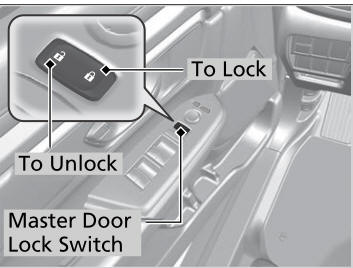
When you lock/unlock the driver’s door using the master door lock switch, all the other doors and the tailgate lock/unlock at the same time.

Copyright © 2026 www.hocrv.com