
Honda CR-V: Auto Idle Stop / Auto Idle Stop System ON/OFF
Honda CR-V 2017-2026 Owner's Manual / Driving / When Driving / Auto Idle Stop / Auto Idle Stop System ON/OFF
To turn the Auto Idle Stop system off, press this button. The Auto Idle Stop system stops.
- Auto Idle Stop system will stop and the indicator (amber) will come on.
The Auto Idle Stop system is turned on every time you start the engine, even if you turned it off the last time you drove the vehicle.
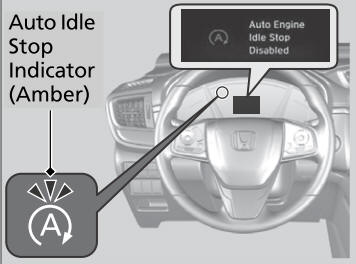
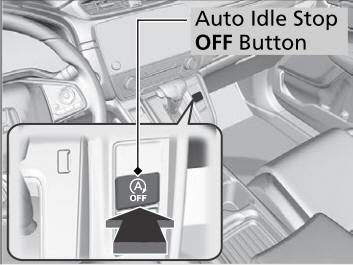
If you turn off the Auto Idle Stop system while it is activated, the engine will restart.
 Auto Idle Stop
To help maximize fuel economy, the engine automatically stops when the
vehicle
comes to a stop, depending on environmental and vehicle operating conditions...
 Auto Idle Stop Activates When:
The vehicle stops with the shift lever in
and the brake pedal depressed.
When you shift into quickly with depressing the brake pedal, the Auto Idle
Stop
continues to operate, even if the brake pedal is released...
Other information:
Honda CR-V 2017-2026 Owner's Manual: Lane Keeping Assist System (LKAS)
Provides steering input to help keep the vehicle in the middle of a detected lane and provides tactile and visual alerts if the vehicle is detected drifting out of its lane. Important Safety Reminders The LKAS is for your convenience only. It is not a substitute for your vehicle control...
Honda CR-V 2017-2026 Owner's Manual: Switching the Display
M..
Categories
- Manuals Home
- Honda CR-V Owners Manual
- Honda CR-V Service Manual
- To rapidly defrost the windows
- Rear Seats
- Quick Reference Guide
- New on site
- Most important about car
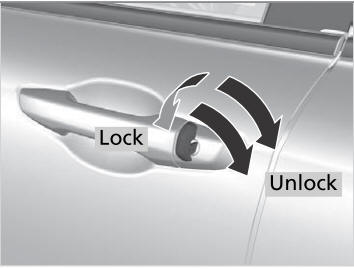
Locking/Unlocking the Doors Using a Key
If the smart entry remote battery or the vehicle battery is dead, use the key instead of the smart entry remote.
Fully insert the key and turn it.

Copyright © 2026 www.hocrv.com