
Honda CR-V: Driving / When Driving
Honda CR-V 2017-2026 Owner's Manual / Driving / When Driving
- Starting the Engine
- Precautions While Driving
- Continuously Variable Transmission
- Shifting
- Auto Idle Stop
- ECON Button
- Front Sensor Camera
- Adaptive Cruise Control (ACC) with Low Speed Follow
- To Set the Vehicle Speed
- Road Departure Mitigation (RDM) System
- Lane Keeping Assist System (LKAS)
- Vehicle Stability Assist™ (VSA®), aka Electronic Stability Control (ESC), System
- Agile Handling Assist
- Blind spot information System*
- LaneWatch™*
- Real Time AWD with Intelligent Control System™*
- Tire Pressure Monitoring System (TPMS)
- Tire Pressure Monitoring System (TPMS) - Required Federal Explanation (U.S. models)
 Avoiding Trouble
Check Out Your Vehicle before you leave the pavement and make sure
that all
scheduled maintenance has been completed. Pay special attention to the
condition of the tires, and check the tire pressures...

Other information:
Honda CR-V 2017-2026 Owner's Manual: Installing a LATCH-Compatible Child Seat
A LATCH-compatible child seat can be installed in any rear seats. A child seat is attached to the lower anchors with either the rigid or flexible type of connectors. Locate the lower anchors under the marks. Place the child seat on the vehicle seat, then attach the child seat to the lower anchors according to the instructions that came with the child seat...
Honda CR-V 2017-2026 Owner's Manual: Changing the Power Mode
*1:Except U.S. models ENGINE START/STOP Button Operating Range You can start the engine when the smart entry remote is inside the vehicle. The engine may also run if the smart entry remote is close to the door or window, even if it is outside the vehicle...
Categories
- Manuals Home
- Honda CR-V Owners Manual
- Honda CR-V Service Manual
- Odometer and Trip Meter
- Wallpaper Setup
- Rear Seats
- New on site
- Most important about car
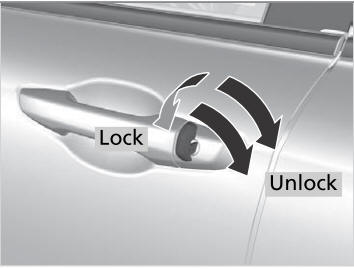
Locking/Unlocking the Doors Using a Key
If the smart entry remote battery or the vehicle battery is dead, use the key instead of the smart entry remote.
Fully insert the key and turn it.

Copyright © 2026 www.hocrv.com