
Honda CR-V: Operating the Switches Around the Steering Wheel / Ignition Switch and Power Mode Comparison
Honda CR-V 2017-2026 Owner's Manual / Controls / Operating the Switches Around the Steering Wheel / Ignition Switch and Power Mode Comparison
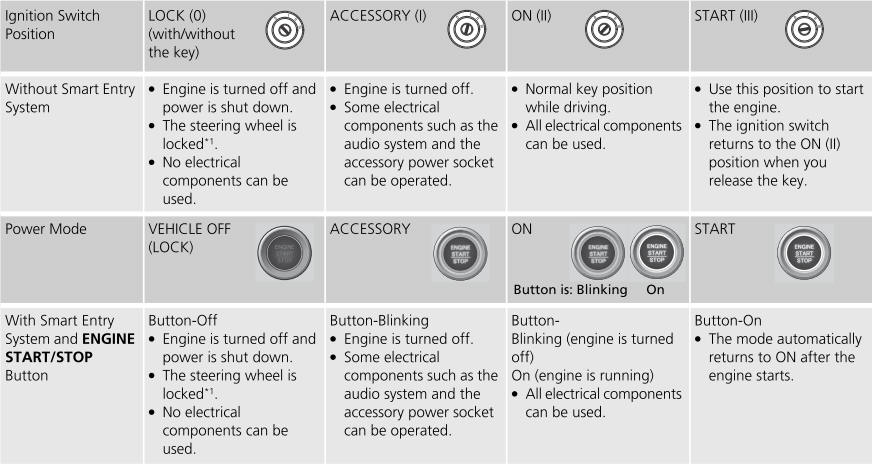
*1:Canadian models
 Smart Entry Remote Reminder
Warning buzzers may sound from inside or/
and outside the vehicle to remind you that the
smart entry remote is out of the vehicle. If the
buzzer continues even after the remote is put
back inside, place it within the system's
operational range...
 Turn Signals
The turn signals can be used when the ignition
switch is in ON *1 .
*1: Models with the smart entry system have an ENGINE START/STOP button
instead of an ignition switch...
Other information:
Honda CR-V 2017-2026 Owner's Manual: Using the Smart Entry with Push Button Start System*
* Not available on all models If you do not open a door or the tailgate within 30 seconds of unlocking the vehicle with the smart entry system, the doors and tailgate will automatically relock. You can lock or unlock doors using the smart entry system only when the power mode is in VEHICLE OFF...
Honda CR-V 2017-2026 Owner's Manual: Automatic Seat Belt Tensioners
The front seats are equipped with automatic seat belt tensioners to enhance safety. The tensioners automatically tighten the front seat belts during a moderate-to-severe frontal collision, sometimes even if the collision is not severe enough to inflate the front airbags...
Categories
- Manuals Home
- Honda CR-V Owners Manual
- Honda CR-V Service Manual
- Compass Zone Selection
- Front Seats
- Front Sensor Camera
- New on site
- Most important about car
Your Vehicle's Safety Features
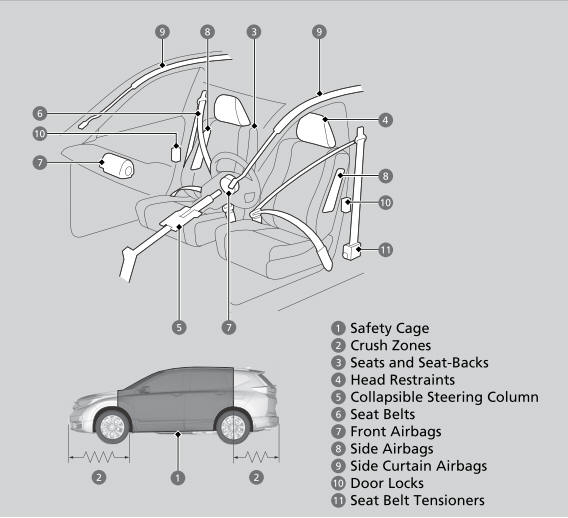
The following checklist will help you take an active role in protecting yourself and your passengers.
Your vehicle is equipped with many features that work together to help protect you and your passengers during a crash.

Copyright © 2026 www.hocrv.com