
Honda CR-V: Controls / Operating the Switches Around the Steering Wheel
Honda CR-V 2017-2026 Owner's Manual / Controls / Operating the Switches Around the Steering Wheel
- Ignition Switch*
- ENGINE START/STOP Button*
- Ignition Switch and Power Mode Comparison
- Turn Signals
- Light Switches
- Fog Lights*
- Auto High-Beam
- Daytime Running Lights
- Wipers and Washers
- Brightness Control
- Defogger/Heated Door Mirror
- Driving Position Memory System*
- Adjusting the Steering Wheel
 Using the Panoramic Roof Switch
Automatic operation
To open: Pull the switch back firmly.
To close: Push the switch forward firmly.
The panoramic roof automatically opens or
closes all the way...
 Ignition Switch*
* Not available on all models
LOCK:
Insert and remove the key in this position.
ACCESSORY: Operate the audio system and other accessories in this
position...
Other information:
Honda CR-V 2017-2026 Owner's Manual: How the Front Airbags Work
While your seat belt restrains your torso, the front airbag provides supplemental protection for your head and chest. The front airbags deflate immediately so that they won't interfere with the driver's visibility or the ability to steer or operate other controls...
Honda CR-V 2017-2026 Owner's Manual: Compass Calibration
If the compass indicates the wrong direction, or the CAL indicator blinks, you need to manually calibrate the system. Turn the ignition switch to ON . Press and hold the (day/night) button until the display shows the compass setting menu...
Categories
- Manuals Home
- Honda CR-V Owners Manual
- Honda CR-V Service Manual
- Oil Check
- How to Use the Auto High-Beam
- Jump Starting Procedure
- New on site
- Most important about car
Auto High-Beam
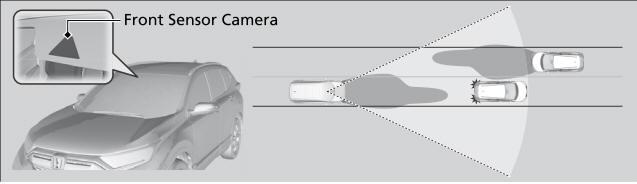
The front sensor camera detects the light sources ahead of the vehicle such as the lights of a preceding or oncoming vehicle, or street lights. When you are driving at night, the system automatically switches the headlights between low beam and high beam depending on the situation.

Copyright © 2026 www.hocrv.com