
Honda CR-V: Operating the Switches Around the Steering Wheel / Light Switches
Honda CR-V 2017-2026 Owner's Manual / Controls / Operating the Switches Around the Steering Wheel / Light Switches
- Manual Operation
- Automatic Operation (automatic lighting control)
- Headlight Integration with Wipers
- Automatic Lighting Off Feature
 Turn Signals
The turn signals can be used when the ignition
switch is in ON *1 .
*1: Models with the smart entry system have an ENGINE START/STOP button
instead of an ignition switch...
 Manual Operation
Rotating the light switch turns the lights on
and off, regardless of the power mode setting
or position of the ignition switch.
High beams
Push the lever forward until you hear a click...
Other information:
Honda CR-V 2017-2026 Owner's Manual: Emergency Towing
Call a professional towing service if you need to tow your vehicle. All models Flat bed equipment The operator loads your vehicle on the back of a truck. This is the best way to transport your vehicle. 2WD models Wheel lift equipment The tow truck uses two pivoting arms that go under the front tires and lift them off the ground...
Honda CR-V 2017-2026 Owner's Manual: How to Set Up the Jack
WARNING The vehicle can easily roll off the jack, seriously injuring anyone underneath. Follow the directions for changing a tire exactly and never get under the vehicle when it is supported only by the jack. Do not use the jack with people or luggage in the vehicle...
Categories
- Manuals Home
- Honda CR-V Owners Manual
- Honda CR-V Service Manual
- Wallpaper Setup
- Auto Idle Stop System ON/OFF
- Interior Fuse Box
- New on site
- Most important about car
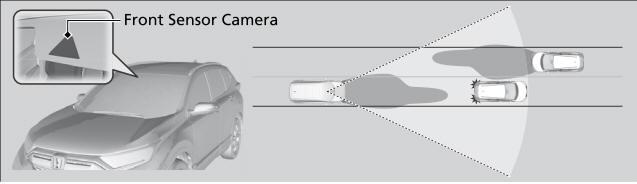
Auto High-Beam
The front sensor camera detects the light sources ahead of the vehicle such as the lights of a preceding or oncoming vehicle, or street lights. When you are driving at night, the system automatically switches the headlights between low beam and high beam depending on the situation.

Copyright © 2026 www.hocrv.com