
Honda CR-V: Operating the Switches Around the Steering Wheel / Auto High-Beam
Honda CR-V 2017-2026 Owner's Manual / Controls / Operating the Switches Around the Steering Wheel / Auto High-Beam
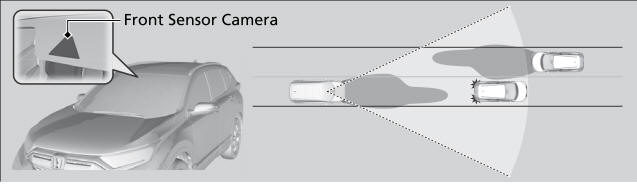
The front sensor camera detects the light sources ahead of the vehicle such as the lights of a preceding or oncoming vehicle, or street lights. When you are driving at night, the system automatically switches the headlights between low beam and high beam depending on the situation.
 Fog Lights*
* Not available on all models
Can be used when the low beam headlights are on.
Rotate the switch up from the OFF position to the
position.
When the fog lights are on, the indicator in the
instrument panel will be on...
 How to Use the Auto High-Beam
When all of the following conditions have been met, the auto high-beam
indicator
comes on and the auto high-beam is activated.
The ignition switch is in ON
*1 ...
Other information:
Honda CR-V 2017-2026 Owner's Manual: When You Cannot Open the Tailgate
If you cannot open the tailgate, use the following procedure: Use a flat-tip screwdriver and remove the cover on the inside of the tailgate. Wrap the flat-tip screwdriver with a cloth to prevent scratches. To open the tailgate, push the tailgate while pushing the lever to the right using a flat-tip screw driver...
Honda CR-V 2017-2026 Owner's Manual: Using the Hands Free Access*
* Not available on all models Use a forward and back kicking motion under the center of the rear bumper to open or close the power tailgate while carrying the smart entry remote. Some exterior lights flash twice and a beeper sounds once, then the tailgate begins to move...
Categories
- Manuals Home
- Honda CR-V Owners Manual
- Honda CR-V Service Manual
- Auto Idle Stop System ON/OFF
- USB Port(s)
- Accessory Power Sockets
- New on site
- Most important about car
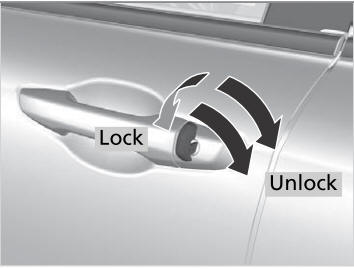
Locking/Unlocking the Doors Using a Key
If the smart entry remote battery or the vehicle battery is dead, use the key instead of the smart entry remote.
Fully insert the key and turn it.

Copyright © 2026 www.hocrv.com