
Honda CR-V: If a Tire Goes Flat / Changing a Flat Tire. Getting Ready to Replace the Flat Tire
Honda CR-V 2017-2026 Owner's Manual / Handling the Unexpected / If a Tire Goes Flat / Changing a Flat Tire. Getting Ready to Replace the Flat Tire
- Open the cargo area floor lid.
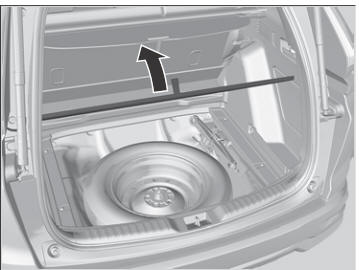
- Take the tool bag out of the cargo area.
Take the wheel nut wrench and jack handle bar out of the tool bag.
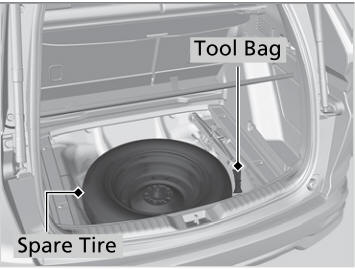
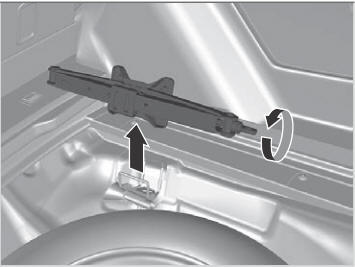
- Take the jack out of the spare tire area.
- Unscrew the wing bolt and remove the
spacer cone. Then remove the spare tire.
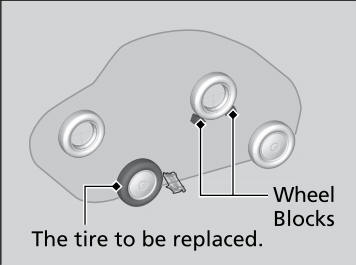
- Place a wheel block or rock in the front and
rear of the wheel diagonal to the flat tire.
- Place the compact spare tire under the
vehicle body (wheel side up) near the tire
that needs to be replaced.
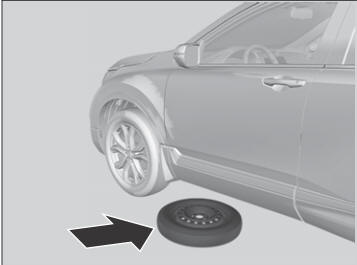
- Loosen each wheel nut about one turn
using the wheel nut wrench.
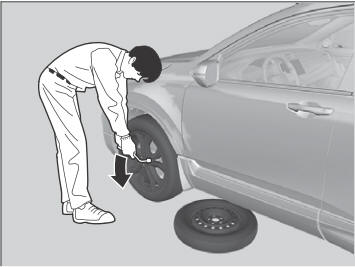
 If a Tire Goes Flat
If a tire goes flat while driving, grasp the steering wheel firmly, and brake
gradually
to reduce speed. Then stop in a safe place. Replace the flat tire with a compact
spare
tire...
 How to Set Up the Jack
WARNING
The vehicle can easily roll off the jack,
seriously injuring anyone underneath.
Follow the directions for changing a tire
exactly and never get under the vehicle
when it is supported only by the jack...
Other information:
Honda CR-V 2017-2026 Owner's Manual: When Stopped
Depress the brake pedal firmly. With the brake pedal depressed, pull up the electric parking brake switch slowly, but fully. Move the shift lever from to . Turn off the engine. The parking brake and brake system indicator goes off in about 15 seconds...
Honda CR-V 2017-2026 Owner's Manual: Automatic Import of Cellular Phonebook and Call History
When Automatic Phone Sync is set to On: When your phone is paired, the contents of its phonebook and call history are automatically imported to the system. Changing the Automatic Phone Sync setting Go to the Phone Settings screen. Select Automatic Phone Sync...
Categories
- Manuals Home
- Honda CR-V Owners Manual
- Honda CR-V Service Manual
- Rear Seats
- How to Use the Auto High-Beam
- Jump Starting Procedure
- New on site
- Most important about car
Your Vehicle's Safety Features
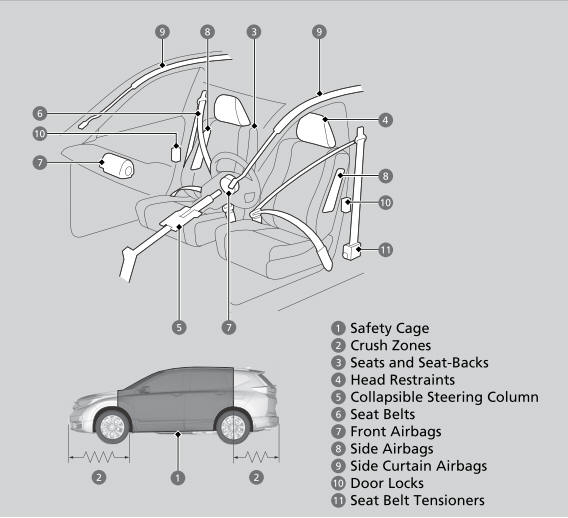
The following checklist will help you take an active role in protecting yourself and your passengers.
Your vehicle is equipped with many features that work together to help protect you and your passengers during a crash.

Copyright © 2026 www.hocrv.com