Honda CR-V: ENGINE START/STOP Button* / Changing the Power Mode
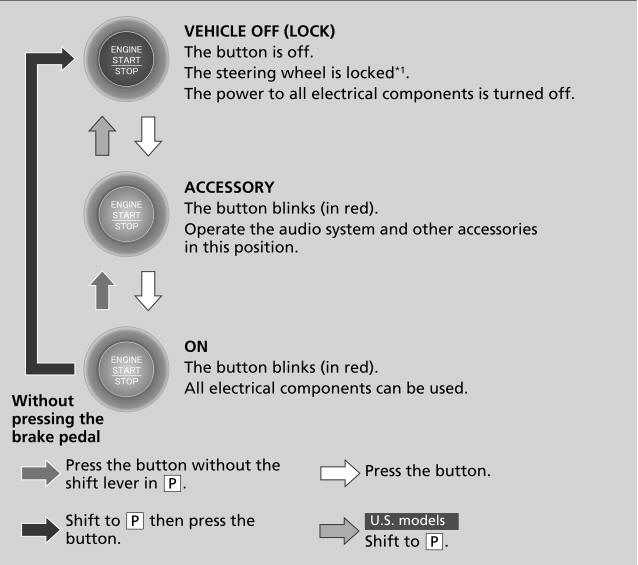
*1:Except U.S. models
ENGINE START/STOP Button Operating Range
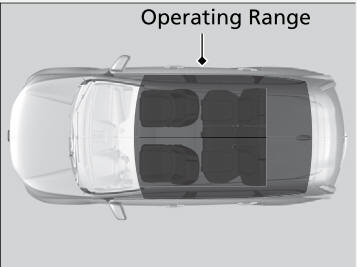
You can start the engine when the smart entry remote is inside the vehicle.
The engine may also run if the smart entry remote is close to the door or window, even if it is outside the vehicle.
If the battery of the smart entry remote is getting low, the engine may not start when you push the ENGINE START/STOP button. If the engine does not start, refer to the following If the Smart Entry Remote Battery is Weak.
The power system may also start if the smart entry remote is close to the door or window, even if it is outside the vehicle.

 Automatic Power Off
If you leave the vehicle for 30 to 60 minutes with the shift lever in
and
the power
mode in ACCESSORY, the vehicle automatically goes into the mode similar to
VEHICLE OFF (LOCK) to avoid the battery drain...
Other information:
Honda CR-V 2017-2026 Owner's Manual: Inspection and Maintenance
For your safety, perform all listed inspections and maintenance to keep your vehicle in good condition. If you become aware of any abnormality (noise, smell, insufficient brake fluid, oil residue on the ground, etc.), have your vehicle inspected by a dealer...
Honda CR-V 2017-2026 Owner's Manual: Switching the Display
M..
Categories
- Manuals Home
- Honda CR-V Owners Manual
- Honda CR-V Service Manual
- Rear Seats
- Interior Fuse Box
- USB Port(s)
- New on site
- Most important about car
Sunglasses Holder
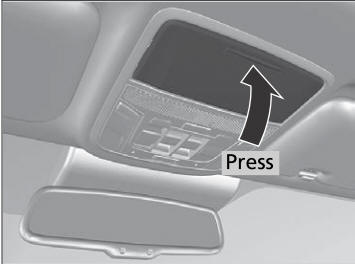
To open the sunglasses holder, press and release the indent. To close, press it again until it latches.
You can store eyeglasses and other small items in this holder.