
Honda CR-V: Gauges and Displays / Gauges
Gauges include the speedometer, tachometer, fuel gauge, and related
indicators.
They are displayed when the ignition switch is in ON
 *1 .
*1 .
*1: Models with the smart entry system have an ENGINE START/STOP button instead of an ignition switch.
Press the  (display/information) button repeatedly until the
 icon is shown on the driver
information interface. Press ENTER, then press and hold it again. The
speedometer reading and the displayed measurements will switch between mph
(U.S.) and km/h (Canada).
icon is shown on the driver
information interface. Press ENTER, then press and hold it again. The
speedometer reading and the displayed measurements will switch between mph
(U.S.) and km/h (Canada).
Speedometer
Displays your driving speed in mph (U.S.) or km/h (Canada).
Tachometer
Shows the number of engine revolutions per minute.
Fuel Gauge
Displays the amount of fuel left in the fuel tank.
NOTICE
You should refuel when the reading approaches
 .
.
Running out of fuel can cause the engine to misfire, damaging the catalytic converter.
The actual amount of remaining fuel may differ from the fuel gauge reading.
Temperature Gauge
Displays the temperature of the engine coolant.
NOTICE
Driving with the temperature gauge pointer in the upper zone can cause serious engine damage. Pull safely to the side of the road and allow engine temperature to return to normal.

 Driver Information Interface
The driver information interface shows the odometer, trip meter, outside
temperature indicator, and other gauges.
It also displays important messages such as warnings and other helpful
information...
Other information:
Honda CR-V 2017-2026 Owner's Manual: Refilling Window Washer Fluid
Check the amount of window washer fluid by looking at the reservoir. If the level is low, fill the washer reservoir. Canadian models If the washer fluid is low, a message appears on the driver information interface. All models Pour the washer fluid carefully...
Honda CR-V 2017-2026 Owner's Manual: Voice Portal Screen
When the (Talk) button is pressed, available voice commands appear on the screen. For a complete list of commands, say “Voice Help” after the beep or select Voice Help. You can see the list of commands in Voice Info on the Info Menu screen. Select Info, then select MENU...
Categories
- Manuals Home
- Honda CR-V Owners Manual
- Honda CR-V Service Manual
- Auto Idle Stop System ON/OFF
- Front Sensor Camera
- Display Setup
- New on site
- Most important about car
Your Vehicle's Safety Features
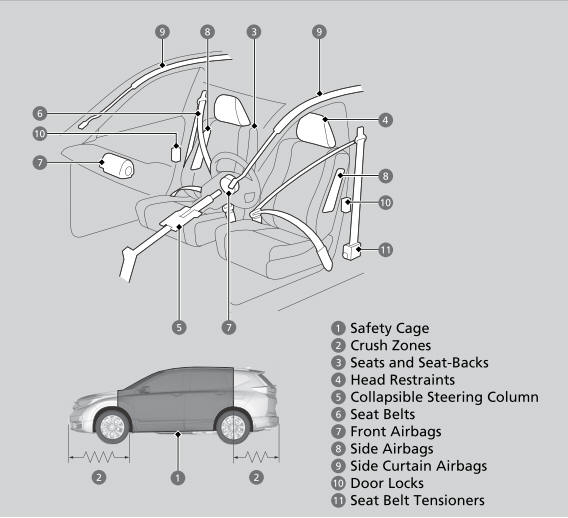
The following checklist will help you take an active role in protecting yourself and your passengers.
Your vehicle is equipped with many features that work together to help protect you and your passengers during a crash.
