
Honda CR-V: Safe Driving / Seat Belts
Honda CR-V 2017-2026 Owner's Manual / Safe Driving / Seat Belts
 Safety Checklist
For the safety of you and your passengers, make a habit of checking these
items
each time before you drive.
After everyone has entered the vehicle, be sure all doors and the
tailgate are
closed and locked...
 About Your Seat Belts
Seat belts are the single most effective safety device because they keep you
connected to the vehicle so that you can take advantage of many built-in safety
features...
Other information:
Honda CR-V 2017-2026 Owner's Manual: Locking a Door Without Using a Key
Locking the driver's door Push the lock tab forward or push the master door lock switch in the lock direction , and close the door. Locking the passenger's doors Push the lock tab forward and close the door. Lockout prevention system Ignition keys with remote transmitter The doors and tailgate cannot be locked when the key is in the ignition switch...
Honda CR-V 2017-2026 Owner's Manual: How the Front Airbags Work
While your seat belt restrains your torso, the front airbag provides supplemental protection for your head and chest. The front airbags deflate immediately so that they won't interfere with the driver's visibility or the ability to steer or operate other controls...
Categories
- Manuals Home
- Honda CR-V Owners Manual
- Honda CR-V Service Manual
- TPMS Calibration
- USB Port(s)
- Interior Fuse Box
- New on site
- Most important about car
Your Vehicle's Safety Features
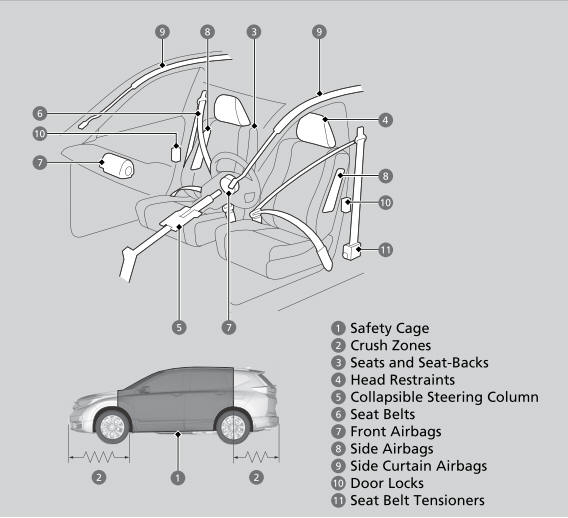
The following checklist will help you take an active role in protecting yourself and your passengers.
Your vehicle is equipped with many features that work together to help protect you and your passengers during a crash.

Copyright © 2026 www.hocrv.com