
Honda CR-V: Safe Driving
Honda CR-V 2017-2026 Owner's Manual / Safe Driving
- For Safe Driving
- Important Safety Precautions
- Important Handling Information
- Your Vehicle's Safety Features
- Safety Checklist
- Seat Belts
- Airbags
- Airbag System Components
- Types of Airbags
- Front Airbags (SRS)
- Side Airbags
- Side Curtain Airbags
- Airbag System Indicators
- Airbag Care
- Child Safety
- Exhaust Gas Hazard
- Safety Labels
 Quick Reference Guide
Auto Idle Stop Function
To improve fuel economy, the engine stops and then restarts as detailed below.
When Auto Idle Stop is on, the Auto Idle Stop indicator (green) comes on...
 For Safe Driving
The following pages explain your vehicle's safety features and how to use
them
properly. The safety precautions below are ones that we consider to be among the
most important...
Other information:
Honda CR-V 2017-2026 Owner's Manual: To Cancel
To cancel ACC with Low Speed Follow, do any of the following: Press the CANCEL button. Press the MAIN button. ACC with Low Speed Follow indicator goes off. Depress the brake pedal while the vehicle is moving forward. Resuming the prior set speed: After you have canceled ACC with Low Speed Follow, you can resume the prior set speed while it is still displayed...
Honda CR-V 2017-2026 Owner's Manual: Identification Numbers
Vehicle Identification Number (VIN), Engine Number, and Transmission Number Your vehicle has a 17-digit vehicle identification number (VIN) used to register your vehicle for warranty purposes, and for licensing and insuring your vehicle. The locations of your vehicle’s VIN, engine number, and transmission number are shown as follows: The interior vehicle identification number (VIN) is located under the cover...
Categories
- Manuals Home
- Honda CR-V Owners Manual
- Honda CR-V Service Manual
- To rapidly defrost the windows
- Multi-View Rear Camera
- Accessory Power Sockets
- New on site
- Most important about car
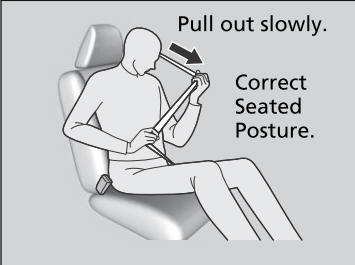
Fastening a Seat Belt
After adjusting a front seat to the proper position, and while sitting upright and well back in the seat:
Pull the seat belt out slowly.

Copyright © 2026 www.hocrv.com