Honda CR-V: Checking and Maintaining Tires / Winter Tires
If driving on snowy or frozen roads, mount all season marked “M+S” tires, snow tires, or tire chains; reduce speed; and maintain sufficient distance between vehicles when driving.
Be particularly careful when operating the steering wheel or brakes to prevent skidding.
Use tire chains, snow tires, or all season tires when necessary or according to the law.
When mounting, refer to the following points.
For winter tires:
- Select the size and load ranges that are the same as the original tires.
- Mount the tires to all four wheels.
For tire chains:
- Install them on the front tires only.
- Because your vehicle has limited tire clearance, we strongly recommend
using the
chains listed below:
Models with 235/65R17 tires
Models with 235/55R19 tires
Cable-type: SCC RADIAL CHAIN TC2111MM
Models with 235/60R18 tires
Cable-type: SCC RADIAL CHAIN TC2212MM
- Follow the chain manufacturer's instruction when installing. Mount them as tightly as you can.
- Check that the chains do not touch the brake lines or suspension.
- Drive slowly.
WARNING
Using the wrong chains, or not properly installing chains, can damage the brake lines and cause a crash in which you can be seriously injured or killed.
Follow all instructions in this owner's manual regarding the selection and use of tire chains.
NOTICE
Traction devices that are the wrong size or improperly installed can damage your vehicle's brake lines, suspension, body, and wheels. Stop driving if they are hitting any part of the vehicle.
When tire chains are mounted, follow the chain manufacturer's instructions regarding vehicle operational limits.
If your vehicle is equipped with summer tires, be aware that these tires are not designed for winter driving conditions. For more information, contact a dealer.
 Tire Rotation
Rotating tires according to the maintenance messages on the driver
information
interface helps to distribute wear more evenly and increase tire life...
 Battery
WARNING
The battery gives off explosive hydrogen
gas during normal operation.
A spark or flame can cause the battery to
explode with enough force to kill or
seriously hurt you...
Other information:
Honda CR-V 2017-2026 Owner's Manual: Using the Remote Transmitter
Locking the doors Press the lock button. Once: Some exterior lights flash, all the doors and tailgate lock, and the security system * sets. Twice (within five seconds after the first push): The beeper sounds and verifies the security system * is set...
Honda CR-V 2017-2026 Owner's Manual: Multi-View Rear Camera
About Your Multi-View Rear Camera The audio/information screen can display your vehicle’s rear view. The display automatically changes to a rear view when the shift lever is moved to . The rear camera view is restricted. You cannot see the corner ends of the bumper or what is underneath the bumper...
Categories
- Manuals Home
- Honda CR-V Owners Manual
- Honda CR-V Service Manual
- Jump Starting Procedure
- Quick Reference Guide
- To rapidly defrost the windows
- New on site
- Most important about car
Advanced Airbags
The airbags have advanced features to help reduce the likelihood of airbag related injuries to smaller occupants.
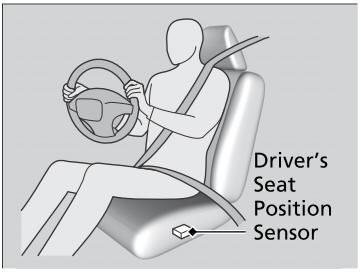
The driver's advanced airbag system includes a seat position sensor.