
Honda CR-V: Checking and Maintaining Tires / Tire Rotation
Rotating tires according to the maintenance messages on the driver information interface helps to distribute wear more evenly and increase tire life.
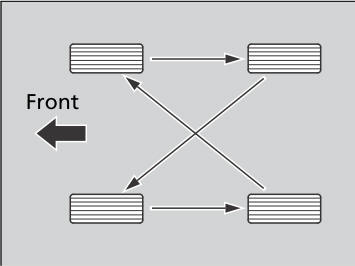
Tires without rotation marks
Rotate the tires as shown here.
Tires with rotation marks
Rotate the tires as shown here.
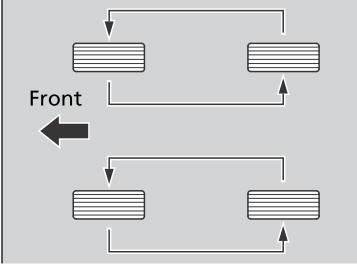
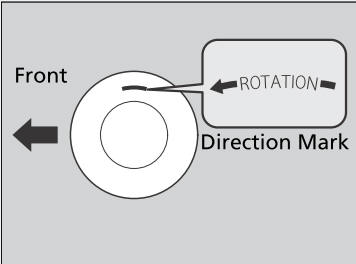
Tires with directional tread patterns should only be rotated front to back (not from one side to the other). Directional tires should be mounted with the rotation indication mark facing forward, as shown below.
Whenever tires are rotated, you must calibrate the TPMS.
 Tire and Wheel Replacement
Replace your tires with radials of the same size, load range, speed rating,
and
maximum cold tire pressure rating (as shown on the tire‘s sidewall)...
 Winter Tires
If driving on snowy or frozen roads, mount all season marked “M+S” tires,
snow
tires, or tire chains; reduce speed; and maintain sufficient distance between
vehicles
when driving...
Other information:
Honda CR-V 2017-2026 Owner's Manual: Odometer and Trip Meter
Odometer Shows the total number of miles (U.S.) or kilometers (Canada) that your vehicle has accumulated. Trip Meter Shows the total number of miles (U.S.) or kilometers (Canada) driven since the last reset. Meters A and B can be used to measure two separate trips...
Honda CR-V 2017-2026 Owner's Manual: How to Select a Song from the Music Search List with the Selector Knob
Press to display the music search list. Rotate to select a category. Press to display a list of items in the category. Rotate to select an item, then press . Press and rotate repeatedly until a desired item you want to listen is displayed...
Categories
- Manuals Home
- Honda CR-V Owners Manual
- Honda CR-V Service Manual
- Auto Idle Stop System ON/OFF
- Display Setup
- Compass Calibration
- New on site
- Most important about car
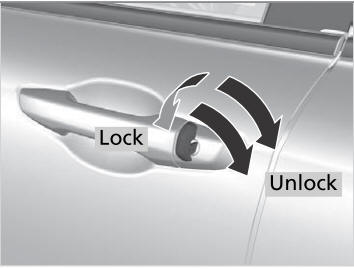
Locking/Unlocking the Doors Using a Key
If the smart entry remote battery or the vehicle battery is dead, use the key instead of the smart entry remote.
Fully insert the key and turn it.

Copyright © 2026 www.hocrv.com