
Honda CR-V: Maintenance Under the Hood / Adding Engine Oil
- Unscrew and remove the engine oil fill cap.
- Add oil slowly.
- Reinstall the engine oil fill cap, and tighten it securely.
- Wait for three minutes and recheck the engine oil dipstick.
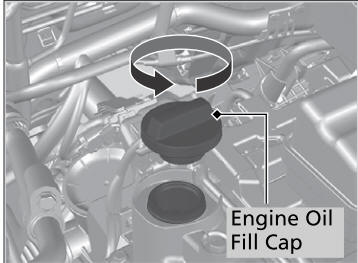
If any oil spills, wipe it away immediately. Spilled oil may damage the engine compartment components.
NOTICE
Do not fill the engine oil above the upper mark. Overfilling the engine oil may result in leaks and engine damage.
 Oil Check
We recommend that you check the engine oil level every time you refuel.
Park the vehicle on level ground.
Wait approximately three minutes after turning the engine off before you
check the
oil...
 Changing the Engine Oil and Oil Filter
You must change the engine oil and oil filter regularly in order to maintain
the
engine's lubrication. The engine may be damaged if they are not changed
regularly...
Other information:
Honda CR-V 2017-2026 Owner's Manual: Identification Numbers
Vehicle Identification Number (VIN), Engine Number, and Transmission Number Your vehicle has a 17-digit vehicle identification number (VIN) used to register your vehicle for warranty purposes, and for licensing and insuring your vehicle. The locations of your vehicle’s VIN, engine number, and transmission number are shown as follows: The interior vehicle identification number (VIN) is located under the cover...
Honda CR-V 2017-2026 Owner's Manual: Protecting Smaller Children
If a child is at least one year old and within the weight range indicated by the child seat manufacturer, the child should be properly restrained in a firmly secured forward-facing child seat. Forward-facing child seat placement We strongly recommend placing a forward-facing child seat in a rear seating position...
Categories
- Manuals Home
- Honda CR-V Owners Manual
- Honda CR-V Service Manual
- Quick Reference Guide
- Head Restraints
- How to Turn Off the Auto High-Beam
- New on site
- Most important about car
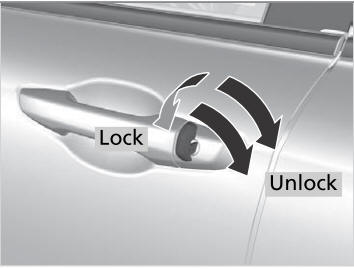
Locking/Unlocking the Doors Using a Key
If the smart entry remote battery or the vehicle battery is dead, use the key instead of the smart entry remote.
Fully insert the key and turn it.

Copyright © 2026 www.hocrv.com