Honda CR-V: Using Automatic Climate Control / Defrosting the Windshield and Windows
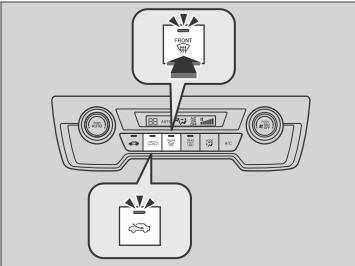
Pressing the  (windshield
defroster) button
turns the air conditioning system on and
automatically switches the system to fresh air
mode.
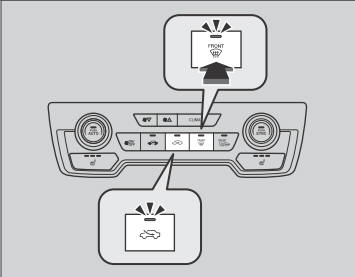
(windshield
defroster) button
turns the air conditioning system on and
automatically switches the system to fresh air
mode.
Press the  button again to turn
off, the
system returns to the previous settings.
button again to turn
off, the
system returns to the previous settings.
For your safety, make sure you have a clear view through all the windows before driving.
Do not set the temperature near the upper or lower limit.
When cold air hits the windshield, the outside of the windshield may fog up.
If the side windows fog up, adjust the vents so that the air hits the side windows.
If you press the  button during
Auto Idle Stop, the
engine restarts automatically.
button during
Auto Idle Stop, the
engine restarts automatically.
 Switching between the recirculation and fresh air modes
Press the (recirculation) or
(fresh air) button to switch the
mode
depending on environmental conditions.
Recirculation mode (indicator
on): Recirculates air from the vehicle’s interior
through the system...
 To rapidly defrost the windows
Press the button.
Press the button.
After defrosting the windows, switch over to fresh air
mode. If you keep the system in recirculation mode,
the windows may fog up from humidity...
Other information:
Honda CR-V 2017-2026 Owner's Manual: Exhaust Gas Hazard
Carbon Monoxide Gas The engine exhaust from this vehicle contains carbon monoxide, a colorless, odorless, and highly toxic gas. As long as you properly maintain your vehicle, carbon monoxide gas will not get into the interior. Have the exhaust system inspected for leaks whenever The exhaust system is making an unusual noise...
Honda CR-V 2017-2026 Owner's Manual: Towing Load Limits
Your vehicle can tow a trailer if you carefully observe the load limits, use the proper equipment, and follow the towing guidelines. Check the load limits before driving. Total trailer weight Maximum allowable weight of the trailer, cargo, and everything in or on it must not exceed 1,500 lbs (680 kg)...
Categories
- Manuals Home
- Honda CR-V Owners Manual
- Honda CR-V Service Manual
- Front Sensor Camera
- Compass Calibration
- Auto Idle Stop System ON/OFF
- New on site
- Most important about car
Sunglasses Holder
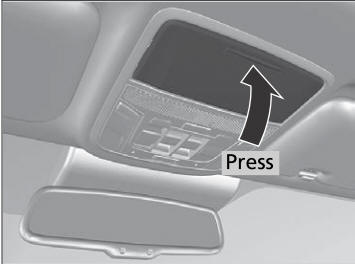
To open the sunglasses holder, press and release the indent. To close, press it again until it latches.
You can store eyeglasses and other small items in this holder.