
Honda CR-V: Handling the Unexpected / Jump Starting
Honda CR-V 2017-2026 Owner's Manual / Handling the Unexpected / Jump Starting
 Emergency Engine Stop
Models with smart entry system
The ENGINE START/STOP button may be used to stop the engine due to an
emergency situation even while driving. If you must stop the engine, do either
of the
following operations:
Press and hold the ENGINE START/STOP button for about two
seconds...
 Jump Starting Procedure
Turn off the power to electric devices, such as the audio and lights. Turn
off the
engine, then open the hood.
Open the terminal cover on your vehicle’s
battery positive terminal...
Other information:
Honda CR-V 2017-2026 Owner's Manual: Auto Idle Stop Activates When:
The vehicle stops with the shift lever in and the brake pedal depressed. When you shift into quickly with depressing the brake pedal, the Auto Idle Stop continues to operate, even if the brake pedal is released. If you move the shift lever slowly, the engine may automatically restarts...
Honda CR-V 2017-2026 Owner's Manual: About Your Audio System
The audio system features AM/FM radio and SiriusXM® Radio service * . It can also play USB flash drives, and iPod, iPhone and Bluetooth® devices. You can operate the audio system from the buttons and switches on the panel, the remote controls on the steering wheel, or the icons on the touchscreen interface * ...
Categories
- Manuals Home
- Honda CR-V Owners Manual
- Honda CR-V Service Manual
- Quick Reference Guide
- Multi-View Rear Camera
- Compass Zone Selection
- New on site
- Most important about car
Advanced Airbags
The airbags have advanced features to help reduce the likelihood of airbag related injuries to smaller occupants.
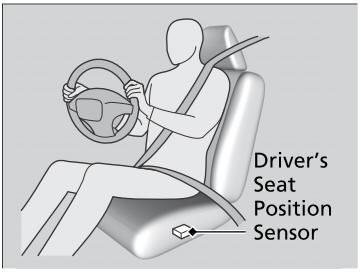
The driver's advanced airbag system includes a seat position sensor.

Copyright © 2026 www.hocrv.com