
Honda CR-V: Panoramic Roof / Using the Sunshade Switch
Automatic operation
To open: Pull the switch back firmly.
To close: Push the switch forward firmly.
The sunshade automatically opens or closes all the way. To stop the sunshade midway, touch the switch briefly.
Manual operation
To open: Pull the switch back lightly, and hold it until the desired position is reached.
To close: Push the switch forward lightly, and hold it until the desired position is reached.
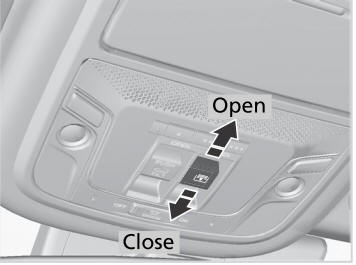
The sunshade can be opened or closed to adjust the amount of light that enters the cabin.
When you use the sunshade switch to open the sunshade, the panoramic roof does not move.
The sunshade cannot be fully closed if the panoramic roof is open. When you close the sunshade with the panoramic roof open, the sunshade stops slightly ahead of the panoramic roof glass. When you push the switch forward again, the sunshade and the panoramic roof close together.
 Opening/Closing the Panoramic Roof
You can operate the panoramic roof when the power mode is in ON. Use the
switch
in the front of the ceiling to open and close the panoramic roof.
WARNING
Opening or closing the panoramic roof or
sunshade on someone’s hands or fingers
can cause serious injury...
 Using the Panoramic Roof Switch
Automatic operation
To open: Pull the switch back firmly.
To close: Push the switch forward firmly.
The panoramic roof automatically opens or
closes all the way...
Other information:
Honda CR-V 2017-2026 Owner's Manual: USB Port(s)
The USB port (1.0A) is for playing audio files on a USB flash drive, connecting a cellular phone, and charging devices. Models with Display Audio The USB port (1.5A) is for charging devices, playing audio files and connecting compatible phones with Apple CarPlay™ or Android Auto™...
Honda CR-V 2017-2026 Owner's Manual: Rear Cargo Cover*
* Not available on all models The rear cargo cover can be used to conceal items in the cargo area and protect them from direct sunlight. To extend: Slightly lift up on the handle at the center edge of the cover to unhook each end, then pull the cover rearward and clip the mounting rods in the hooks at both sides of the tailgate opening...
Categories
- Manuals Home
- Honda CR-V Owners Manual
- Honda CR-V Service Manual
- Odometer and Trip Meter
- Oil Check
- Rear Seats
- New on site
- Most important about car
Your Vehicle's Safety Features
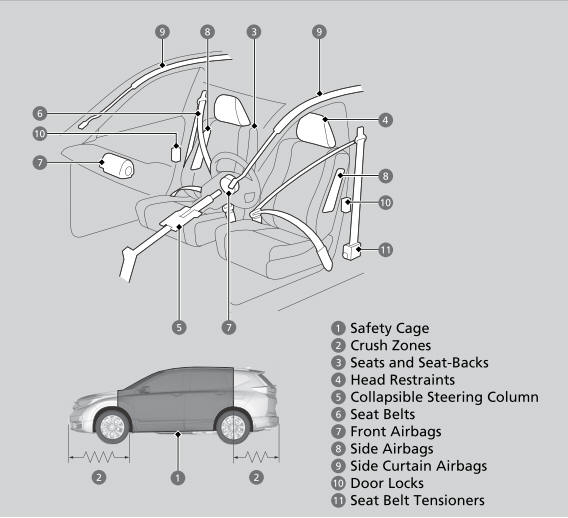
The following checklist will help you take an active role in protecting yourself and your passengers.
Your vehicle is equipped with many features that work together to help protect you and your passengers during a crash.
