
Honda CR-V: Controls / Panoramic Roof
Honda CR-V 2017-2026 Owner's Manual / Controls / Panoramic Roof
 Moonroof
Opening and Closing the Moonroof
You can operate the moonroof when the power mode is in ON. Use the switch in
the front of the ceiling to open and close the moonroof...
 Opening/Closing the Panoramic Roof
You can operate the panoramic roof when the power mode is in ON. Use the
switch
in the front of the ceiling to open and close the panoramic roof.
WARNING
Opening or closing the panoramic roof or
sunshade on someone’s hands or fingers
can cause serious injury...
Other information:
Honda CR-V 2017-2026 Owner's Manual: How to Select a Play Mode
You can select repeat and shuffle modes when playing a song. Available mode icons appear above the play mode buttons. Press the button corresponding to the mode you want to select. To turn off a play mode Press the selected button. Play Mode Menu Items Shuffle Albums: Plays all available albums in a selected category (playlists, artists, albums, songs, genres, or podcasts, audiobooks, and composers) in random order...
Honda CR-V 2017-2026 Owner's Manual: Power Door Mirrors
You can adjust the door mirrors when the ignition switch is in ON *1 . *1: Models with the smart entry system have an ENGINE START/STOP button instead of an ignition switch. Mirror position adjustment L/R selector switch: Select the left or right mirror...
Categories
- Manuals Home
- Honda CR-V Owners Manual
- Honda CR-V Service Manual
- To rapidly defrost the windows
- Wallpaper Setup
- Compass Zone Selection
- New on site
- Most important about car
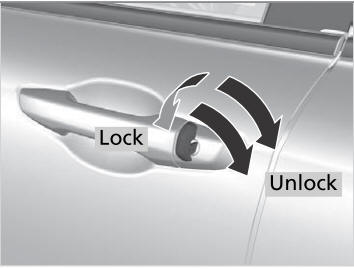
Locking/Unlocking the Doors Using a Key
If the smart entry remote battery or the vehicle battery is dead, use the key instead of the smart entry remote.
Fully insert the key and turn it.

Copyright © 2026 www.hocrv.com