
Honda CR-V: Information
Honda CR-V 2017-2026 Owner's Manual / Information
- Specifications
- Identification Numbers
- Devices that Emit Radio Waves
- Reporting Safety Defects
- Emissions Testing
- Warranty Coverages
- Authorized Manuals
- Customer Service Information
 Refueling
If you have run out of fuel and need to refuel your vehicle from a portable
fuel
container, use the funnel provided with your vehicle.
Turn off the engine...
 Specifications
V..
Other information:
Honda CR-V 2017-2026 Owner's Manual: Maintenance Items Under the Hood
Opening the Hood Park the vehicle on a level surface, and set the parking brake. Pull the hood release handle under the lower left corner of the dashboard. The hood will pop up slightly. Push the hood latch lever (located under the front edge of the hood to the center) to the side and raise the hood...
Honda CR-V 2017-2026 Owner's Manual: Audio System Basic Operation
Models with Display Audio To use the audio system function, the power mode must be in ACCESSORY or ON. (Home): Select to go to the home screen. (Map) * : Select to display the map screen. (Audio): Select to display the audio screen. (Phone): Select to display the phone screen...
Categories
- Manuals Home
- Honda CR-V Owners Manual
- Honda CR-V Service Manual
- Wallpaper Setup
- How to Turn Off the Auto High-Beam
- Head Restraints
- New on site
- Most important about car
Your Vehicle's Safety Features
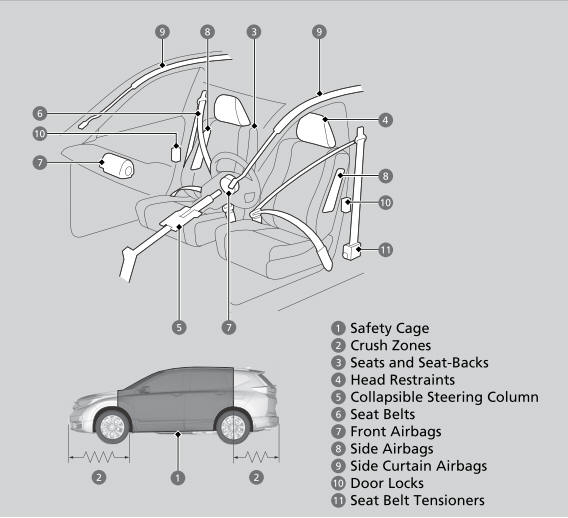
The following checklist will help you take an active role in protecting yourself and your passengers.
Your vehicle is equipped with many features that work together to help protect you and your passengers during a crash.

Copyright © 2026 www.hocrv.com