
Honda CR-V: Adjusting the Mirrors / Power Door Mirrors
You can adjust the door mirrors when the
ignition switch is in ON  *1 .
*1 .
*1: Models with the smart entry system have an ENGINE START/STOP button instead of an ignition switch.
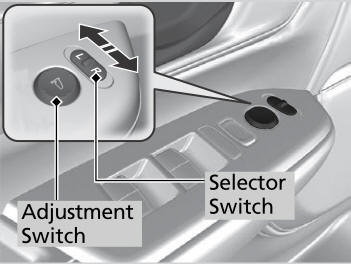
Mirror position adjustment
L/R selector switch: Select the left or right mirror. After adjusting the mirror, return the switch to the center position.
Mirror position adjustment switch: Press the switch left, right, up, or down to move the mirror.
 Automatic Dimming Rearview Mirror*
* Not available on all models
When driving after dark, the automatic
dimming rearview mirror reduces the glare
from headlights behind you. This feature is
always active...

Other information:
Honda CR-V 2017-2026 Owner's Manual: How to Select a Play Mode
You can select repeat and shuffle modes when playing a song. Available mode icons appear above the play mode buttons. Press the button corresponding to the mode you want to select. To turn off a play mode Press the selected button. Play Mode Menu Items Shuffle Albums: Plays all available albums in a selected category (playlists, artists, albums, songs, genres, or podcasts, audiobooks, and composers) in random order...
Honda CR-V 2017-2026 Owner's Manual: Cross Traffic Monitor On and Off
You can switch on and off the system using the audio/information screen. Select . Select Settings. Select Camera. Select Cross Traffic Monitor. Select On or Off, then select OK. The system can also be turned on and off on the audio/information screen by pressing the CTM icon...
Categories
- Manuals Home
- Honda CR-V Owners Manual
- Honda CR-V Service Manual
- Accessory Power Sockets
- Front Seats
- Display Setup
- New on site
- Most important about car
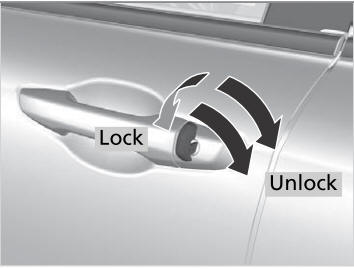
Locking/Unlocking the Doors Using a Key
If the smart entry remote battery or the vehicle battery is dead, use the key instead of the smart entry remote.
Fully insert the key and turn it.

Copyright © 2026 www.hocrv.com