
Honda CR-V: Controls / Locking and Unlocking the Doors
Honda CR-V 2017-2026 Owner's Manual / Controls / Locking and Unlocking the Doors
- Key Types and Functions
- Low Smart Entry Remote Signal Strength*
- Locking/Unlocking the Doors from the Outside
- Locking/Unlocking the Doors from the Inside
- Childproof Door Locks
- Auto Door Locking/Unlocking
 Clock
Clock
Adjusting the Clock
Models without navigation system
You can adjust the time in the clock display with the ignition switch in ON
*1.
*1: Models with the smart entry system have an ENGINE START/STOP
button instead of an
ignition switch...
 Key Types and Functions
All the keys have an immobilizer system. The immobilizer system helps protect
against vehicle theft.
The keys contain precision electronics.
Adhere to the following advice to prevent damage to the electronics:
Do not leave the keys in direct sunlight, or in locations with high
temperature or high humidity...
Other information:
Honda CR-V 2017-2026 Owner's Manual: Remote Transmitter Care
Replacing the Button Battery If the indicator does not come on when the button is pressed, replace the battery. WARNING CHEMICAL BURN HAZARD The battery that powers the remote transmitter can cause severe internal burns and can even lead to death if swallowed...
Honda CR-V 2017-2026 Owner's Manual: How to Use the Auto High-Beam
When all of the following conditions have been met, the auto high-beam indicator comes on and the auto high-beam is activated. The ignition switch is in ON *1 . The light switch is in AUTO. The lever is in the low beam position. The headlights have been automatically activated...
Categories
- Manuals Home
- Honda CR-V Owners Manual
- Honda CR-V Service Manual
- Display Setup
- Front Sensor Camera
- Auto Idle Stop System ON/OFF
- New on site
- Most important about car
Auto High-Beam
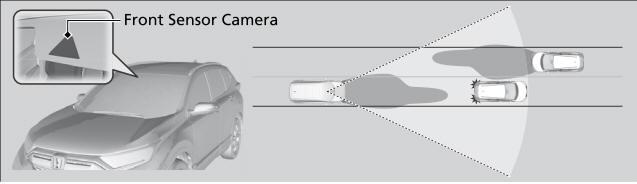
The front sensor camera detects the light sources ahead of the vehicle such as the lights of a preceding or oncoming vehicle, or street lights. When you are driving at night, the system automatically switches the headlights between low beam and high beam depending on the situation.

Copyright © 2026 www.hocrv.com