
Honda CR-V: Climate Control System / Synchronization Mode*
* Not available on all models
You can set the temperature synchronously for the driver’s side and the passenger’s side in synchronization mode.
- Press the SYNC button.
- The system switches to synchronization mode.
- Adjust the temperature using the driver’s side temperature control dial.
- Press the SYNC button to return to dual mode.
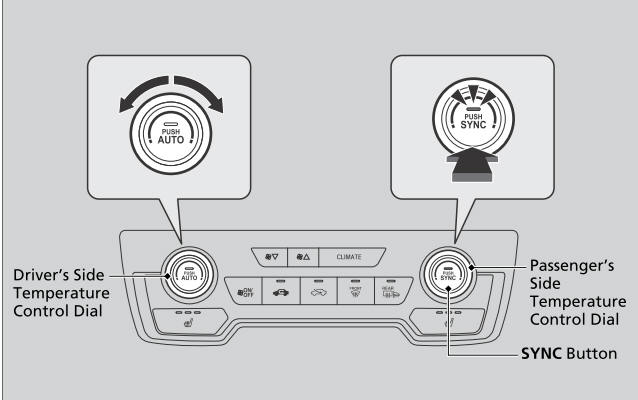
When the system is in dual mode, the driver’s side temperature and the passenger’s side temperature can be set separately.
 To rapidly defrost the windows
Press the button.
Press the button.
After defrosting the windows, switch over to fresh air
mode. If you keep the system in recirculation mode,
the windows may fog up from humidity...

Other information:
Honda CR-V 2017-2026 Owner's Manual: Airbag Care
You do not need to, and should not, perform any maintenance on or replace any airbag system components yourself. However, you should have your vehicle inspected by a dealer in the following situations: When the airbags have deployed If an airbag has inflated, the control unit and other related parts must be replaced...
Honda CR-V 2017-2026 Owner's Manual: SiriusXM® Radio Display Messages
Requested Channel Not Subscribed: You are not subscribed to the channel selected. Subscription Updated: SiriusXM® radio is receiving information update from the network. Channel Not Available: No such channel exists, or the artist or title information is unavailable...
Categories
- Manuals Home
- Honda CR-V Owners Manual
- Honda CR-V Service Manual
- Compass Zone Selection
- Auto Idle Stop System ON/OFF
- Front Seats
- New on site
- Most important about car
Seat Belt Reminder
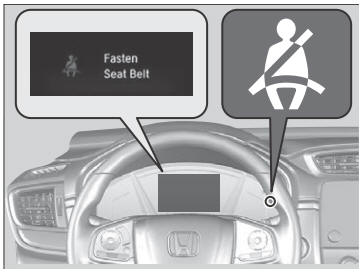
The seat belt system includes an indicator on the instrument panel to remind the driver or a front passenger or both to fasten their seat belts.
If the ignition switch is turned to ON
 *1 and
a seat belt is not fastened, a beeper will sound
and the indicator will blink. After a few
seconds, the beeper will stop and the
indicator will come on and remain illuminated
until the seat belt is fastened.
*1 and
a seat belt is not fastened, a beeper will sound
and the indicator will blink. After a few
seconds, the beeper will stop and the
indicator will come on and remain illuminated
until the seat belt is fastened.

Copyright © 2026 www.hocrv.com