
Honda CR-V: Locking/Unlocking the Doors from the Outside / Using the Remote Transmitter
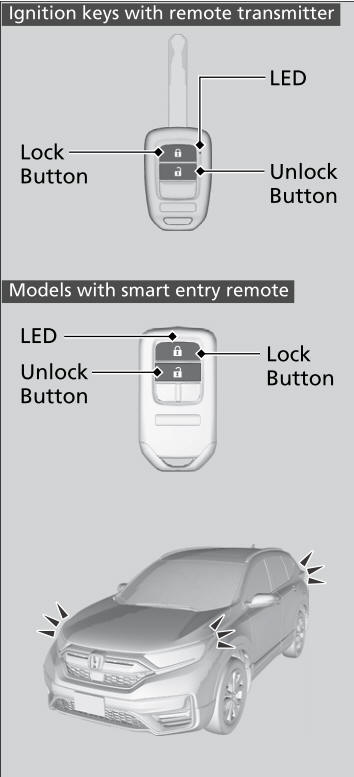
Locking the doors
Press the lock button.
Once:
- Some exterior lights flash, all the doors and tailgate lock, and the security system * sets.
Twice (within five seconds after the first push):
- The beeper sounds and verifies the security system * is set.
Unlocking the doors
Press the unlock button.
Once:
- Some exterior lights flash twice, and the driver's door unlocks.
Twice:
- The remaining doors and tailgate unlock.
If you do not open a door or the tailgate within 30 seconds of unlocking the vehicle with the remote transmitter, the doors and tailgate will automatically relock.
You can change the relock timer setting.
The remote transmitter will not work when:
Ignition keys with remote transmitter
- The key is in the ignition switch.
Models with smart entry remote
- The power mode is not in VEHICLE OFF.
The remote transmitter uses low-power signals, so the operating range may vary depending on the surroundings.
The remote will not lock the vehicle when a door is open.
If the distance at which the remote transmitter works varies, the battery is probably low.
If the LED does not come on when you press a button, the battery is dead.
You can customize the door unlock mode setting.
 Using the Smart Entry with Push Button Start System*
* Not available on all models
If you do not open a door or the tailgate within 30 seconds of unlocking the
vehicle with the smart entry system, the doors and tailgate will automatically
relock...
 Locking/Unlocking the Doors Using a Key
If the smart entry remote battery or the vehicle battery is dead, use the key
instead of the smart entry remote.
Fully insert the key and turn it.
When you lock the driver's door with a key, all the other doors and tailgate
lock at the same time...
Other information:
Honda CR-V 2017-2026 Owner's Manual: Auto Idle Stop Activates When:
The vehicle stops with the shift lever in and the brake pedal depressed. When you shift into quickly with depressing the brake pedal, the Auto Idle Stop continues to operate, even if the brake pedal is released. If you move the shift lever slowly, the engine may automatically restarts...
Honda CR-V 2017-2026 Owner's Manual: Tire Rotation
Rotating tires according to the maintenance messages on the driver information interface helps to distribute wear more evenly and increase tire life. Tires without rotation marks Rotate the tires as shown here. Tires with rotation marks Rotate the tires as shown here...
Categories
- Manuals Home
- Honda CR-V Owners Manual
- Honda CR-V Service Manual
- Odometer and Trip Meter
- Compass Zone Selection
- Head Restraints
- New on site
- Most important about car
Seat Belt Reminder
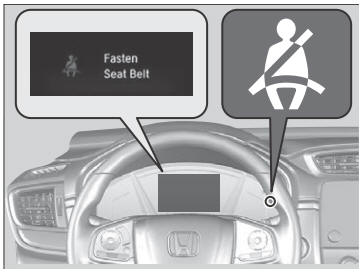
The seat belt system includes an indicator on the instrument panel to remind the driver or a front passenger or both to fasten their seat belts.
If the ignition switch is turned to ON
 *1 and
a seat belt is not fastened, a beeper will sound
and the indicator will blink. After a few
seconds, the beeper will stop and the
indicator will come on and remain illuminated
until the seat belt is fastened.
*1 and
a seat belt is not fastened, a beeper will sound
and the indicator will blink. After a few
seconds, the beeper will stop and the
indicator will come on and remain illuminated
until the seat belt is fastened.
