
Honda CR-V: Interior Lights/Interior Convenience Items / Cargo Area Lights and Glove Box
Honda CR-V 2017-2026 Owner's Manual / Controls / Interior Lights/Interior Convenience Items / Cargo Area Lights and Glove Box
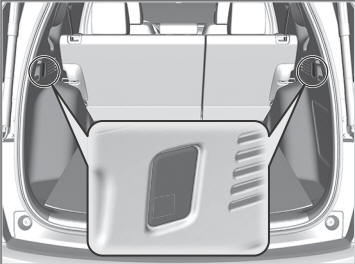
Cargo Area Lights
The lights come on when you open the tailgate.
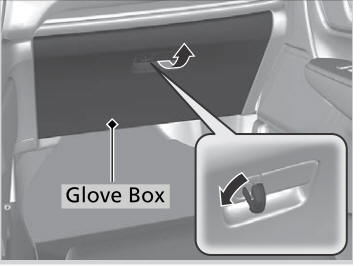
Glove Box
Pull the handle to open the glove box. You can lock the glove box with the master key or the built-in key.
WARNING
An open glove box can cause serious injury to your passenger in a crash, even if the passenger is wearing the seat belt.
Always keep the glove box closed while driving.
 Map Lights
Front
Models without panoramic roof
The map lights can be turned on and off by
pressing the lens.
When the interior light switch is in the door activated
position and any door is open, the map light will not
go off when you press the lens...
 Center Console Box
You can change the position of the tray by
sliding it forward or back.
If you want to make greater use of the console
box:
Pull the knob to open the armrest...
Other information:
Honda CR-V 2017-2026 Owner's Manual: Sunglasses Holder
To open the sunglasses holder, press and release the indent. To close, press it again until it latches. You can store eyeglasses and other small items in this holder. Keep the holder closed while driving except when accessing stored items. Conversation mirror The sunglasses holder comes with a mirror...
Honda CR-V 2017-2026 Owner's Manual: To Cancel
To cancel ACC with Low Speed Follow, do any of the following: Press the CANCEL button. Press the MAIN button. ACC with Low Speed Follow indicator goes off. Depress the brake pedal while the vehicle is moving forward. Resuming the prior set speed: After you have canceled ACC with Low Speed Follow, you can resume the prior set speed while it is still displayed...
Categories
- Manuals Home
- Honda CR-V Owners Manual
- Honda CR-V Service Manual
- Head Restraints
- To rapidly defrost the windows
- How to Turn Off the Auto High-Beam
- New on site
- Most important about car
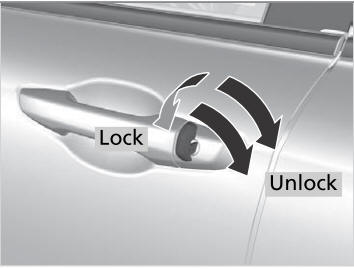
Locking/Unlocking the Doors Using a Key
If the smart entry remote battery or the vehicle battery is dead, use the key instead of the smart entry remote.
Fully insert the key and turn it.

Copyright © 2026 www.hocrv.com