
Honda CR-V: Controls / Interior Lights/Interior Convenience Items
Honda CR-V 2017-2026 Owner's Manual / Controls / Interior Lights/Interior Convenience Items
- Interior Light Switches
- Map Lights
- Cargo Area Lights and Glove Box
- Center Console Box
- Under-floor Storage Area
- Beverage Holders
- Accessory Power Sockets
- Wireless Charger*
- Coat Hook
- Tie-down Anchors
- Cargo Hooks
- Sunglasses Holder
- Heated Steering Wheel *
- Front Seat Heaters*
- Rear Seat Heaters *
- Rear Cargo Cover*
 Armrest
Using the Front Seat Armrest
The console lid can be used as an armrest.
To adjust: Slide the armrest to a desired position.
Using the Rear Seat Armrest
Pull down the armrest in the center seat-back...
 Interior Light Switches
ON
The interior lights come on regardless of
whether the doors are open or closed.
Door activated
The interior lights come on in the following
situations:
When any doors are opened...
Other information:
Honda CR-V 2017-2026 Owner's Manual: Wallpaper Setup
You can change, store, and delete the wallpaper on the audio/information screen. Import wallpaper You can import up to five images, one at a time, for wallpaper from a USB flash drive. Connect the USB flash drive to the USB port. Select Settings...
Honda CR-V 2017-2026 Owner's Manual: To Cancel
To cancel ACC with Low Speed Follow, do any of the following: Press the CANCEL button. Press the MAIN button. ACC with Low Speed Follow indicator goes off. Depress the brake pedal while the vehicle is moving forward. Resuming the prior set speed: After you have canceled ACC with Low Speed Follow, you can resume the prior set speed while it is still displayed...
Categories
- Manuals Home
- Honda CR-V Owners Manual
- Honda CR-V Service Manual
- Wallpaper Setup
- Compass Zone Selection
- Display Setup
- New on site
- Most important about car
Sunglasses Holder
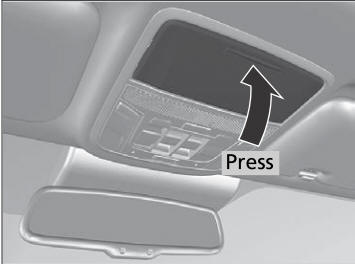
To open the sunglasses holder, press and release the indent. To close, press it again until it latches.
You can store eyeglasses and other small items in this holder.

Copyright © 2026 www.hocrv.com